
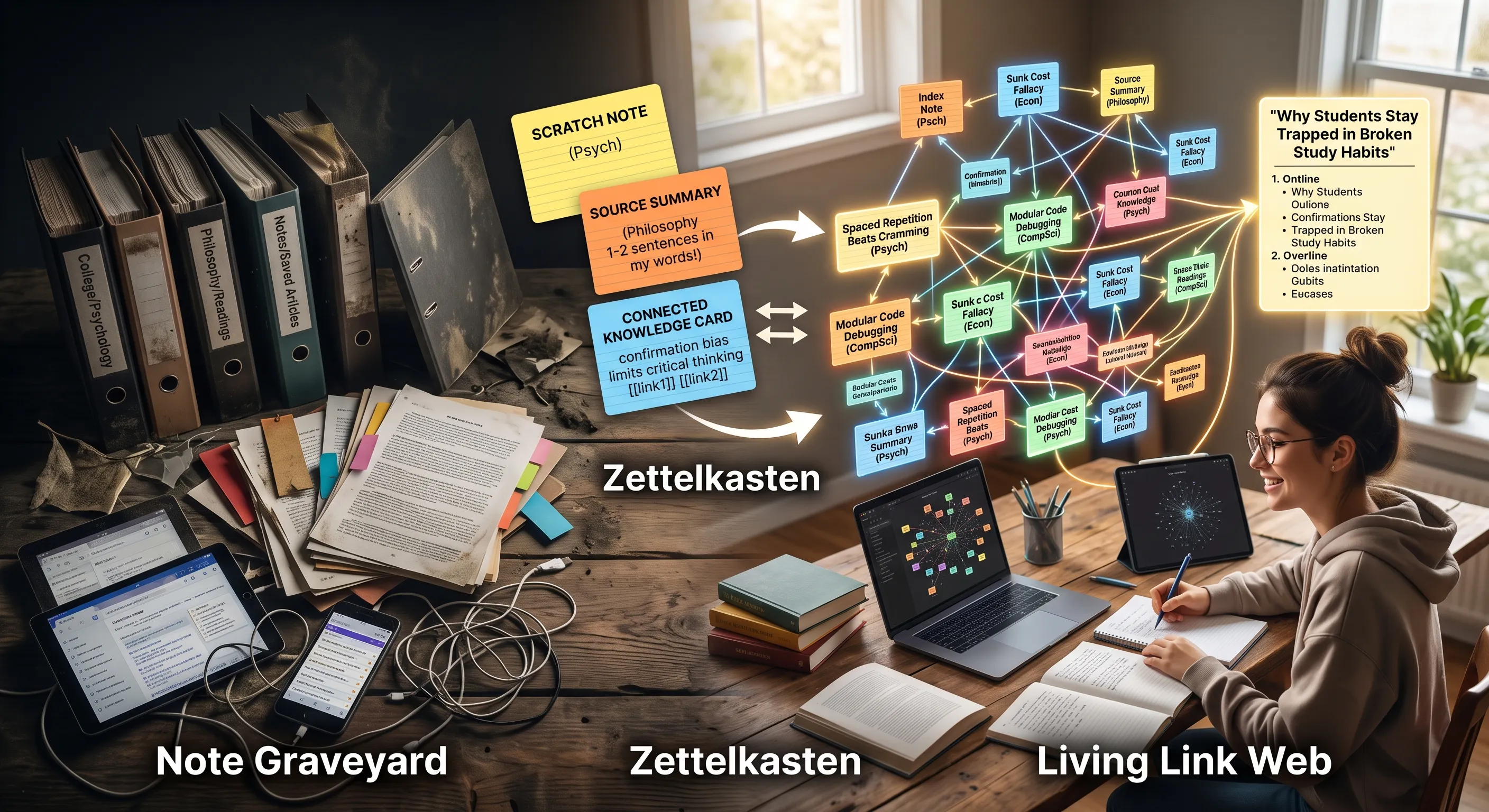
When I walked into my first college lecture hall, I thought being organized meant saving everything. Within two months, my note app was a digital swamp: over 600 bookmarks, highlighted PDF snippets, and random bullet lists sitting untouched in nested folders. Whenever an essay or exam came around, opening that app felt like walking through a graveyard of forgotten thoughts.
I was trapped in what Christian Tietze, the writer who coined the term, calls the Collector’s Fallacy—the subconscious belief that saving an idea is the same as learning it. Tucking a quote into a folder gave me a quick burst of accomplishment, but when test time arrived, those isolated notes helped very little.
I needed a system that actually put ideas to work without burning hours on system maintenance. That is when I found the Zettelkasten method and stripped away all the confusing academic rules to create a lightweight, plain-English framework. In this guide, I will show you how to set up an effortless note network that connects your classes naturally, turns essay writing into a quick puzzle, and keeps you from ever losing a good thought again.
The Note Graveyard Trap: Why Traditional Folders Silo and Kill Your Best Thoughts
Most of us were taught to store files like paper inside physical folders. On your computer or tablet, that usually looks like:
College/Semester 1/Intro to Psychology/Lecture 04
College/Semester 1/Philosophy 101/Readings
While this seems logical on day one, it quickly creates rigid digital silos that isolate related thoughts.
The Problem with Hierarchical Folders
When an idea is locked inside a deep folder path like /Books/Philosophy, it is trapped in a linear dead end. What happens when a concept from your Philosophy class directly explains a cognitive bias mentioned in your Psychology lecture? In a traditional folder setup, you have to choose one single home for that insight. Once you hide it away in one course folder, it becomes invisible to all your other subjects.
Top-Down vs. Bottom-Up Organization
Top-down organization requires you to predict where an idea fits before you even understand it. This creates decision fatigue every time you take notes: “Should this go under Study Skills, Psychology, or General Reading?”
Bottom-up organization flips this dynamic completely. You keep insights as individual cards and link them across subject lines. Instead of pre-building rigid shelves before buying books, you allow natural clusters of knowledge to form organically over time based on what you are actually studying.
Visual Concept: The Folder Graveyard versus the Living Link Web
- The Folder Graveyard (Linear Dead Ends): Folder A → Subfolder B → Note 1 (Isolated, cannot be reached from outside).
- The Living Link Web (Multi-Directional Nodes): Note A ↔ Note B ↔ Note C (Freely interconnected across courses).
| Feature | Traditional Folders | Zettelkasten |
|---|---|---|
| Organization | Top-down by topic | Bottom-up by connection |
| Cross-subject links | Impossible without duplication | Native via direct links |
| Discovery | Manual browsing | Emerges from the network |
| Essay writing | Scramble to find related notes | Outline writes itself |
| Learning signal | Saving = feels like progress | Linking = actual understanding |
How to Take Smart Notes (Zettelkasten Style) Without the German Jargon
The original Zettelkasten system was developed by German sociologist Niklas Luhmann, who used it to publish over 70 books and nearly 400 scholarly articles during his career at Bielefeld University. His personal Zettelkasten contained roughly 90,000 handwritten index cards—the original “second brain.”
However, reading about how to take smart notes Zettelkasten style online often feels overwhelming because of the complex terminology. Let’s translate those academic concepts into straightforward language.
Eliminating Academic Noise
You do not need to memorize historical vocabulary to manage your college coursework. All you need are three distinct phases: capture, distill, and connect. Moving an idea through these three simple stages transforms raw information into personal understanding.
The Lego-Brick Philosophy
Think of your notes as individual Lego bricks rather than finished statues. When you write a massive five-page document on a single lecture topic, you can only reuse that entire document as one heavy block. But when you break your thoughts down into single, modular insights—one idea per card—drafting an essay or studying for finals becomes a matter of snapping existing blocks together.
The 3-Card Engine: The Only Note Formats You Need in Your Daily Routine
To keep your daily workflow completely frictionless, you only need three basic note cards:
Card 1 — The Quick Scratch Note (Capture Phase)
This is your temporary inbox. When your professor mentions a fascinating point, or an interesting question pops into your head during study hall, write it down fast. Do not worry about neat formatting, correct spelling, or where it belongs. Keep a physical pocket notebook or an unformatted daily log on your phone.
If you want to automate this capture step, AI note-taking tools can transcribe lectures and meetings in real time—freeing you to focus on thinking instead of writing. The capture phase is where these tools shine; the distillation and linking phases still need your brain.
Card 2 — The Single-Idea Summary (Distillation Phase)
When reading a textbook chapter or reviewing lecture slides, never copy long passages word for word. Force yourself to rewrite the core point in one or two clear sentences using your own vocabulary. If you cannot explain an idea simply, you have not fully understood it yet.
Card 3 — The Connected Permanent Card (Knowledge Asset)
This is where your knowledge compounds. Take your distilled summary, give it a clear title, and place it into your main digital repository. Instead of assigning it to a specific course folder or piling on dozens of vague tags, add direct links to at least one or two existing cards in your system.
How Ideas Organize Themselves: The Simple 2-Link Rule for Bottom-Up Emergence
You do not need complicated filing systems or artificial intelligence algorithms to sort your notes. The network builds itself using one consistent practice: The Two-Link Protocol.
The “Two-Link” Protocol
Whenever you write a new permanent card, ask yourself: “What two existing ideas does this remind me of?”
Find two cards already sitting in your collection and add direct links to them. By tying every new card to two prior thoughts, you build a self-organizing web. If you bring in a new card about study habits, link it to a card on memory retrieval and a card on time management. Over weeks of classes, these individual pathways weave into comprehensive study guides on their own.
How Unexpected Clusters Form
Here is a real example from my own notes showing how cross-disciplinary thinking works:
- Card A (Psychology): Spaced repetition beats cramming because memory decays exponentially.
- Card B (Computer Science): Modular code makes debugging faster by isolating errors.
- Card C (Economics): Sunk cost fallacy prevents people from quitting broken strategies.
When working on a college term paper about building healthy study routines, these three cards naturally collided into a unique outline: “Why students stay trapped in broken study habits (Sunk Cost Fallacy), how to split study tasks into atomic units (Modularity), and how to schedule reviews for maximum retention (Spaced Repetition).” The outline wrote itself before I even opened a blank document.
This is exactly how AI agents build long-term memory—through knowledge graphs where concepts link to each other rather than sitting in isolated databases. Your Zettelkasten is a human-scale version of the same architecture.
The 10-Minute Daily Triage: A Zero-Maintenance Routine for High-Output Students
A note-taking system only works if you can maintain it during heavy exam weeks. The secret is spending ten focused minutes each evening clearing your temporary inbox.
Step 1: Open Your Scratch Notes (Minutes 0–3): Skim the quick points you jotted down during lectures and readings throughout the day.
Step 2: Distill and Discard (Minutes 3–7): Delete trivial reminders. Take the 1 or 2 genuinely interesting ideas and rewrite them onto permanent cards in your own words.
Step 3: Connect the Links (Minutes 7–10): Link those new cards to two older notes. Close the app and move on with your evening.
The beauty of linking notes directly is that your knowledge stays organized by relevance rather than appearance. Once you have a system running, you can even explore how local language models can act as life-archivists—automatically surfacing connections in your growing knowledge graph.
Choosing Your Zettelkasten Tool: Obsidian vs. Notion
Both Obsidian and Notion support Zettelkasten workflows, but they approach it differently:
| Feature | Obsidian | Notion |
|---|---|---|
| Linking | Native [[wiki-links]] with backlinks | Relational databases with rollups |
| Graph view | Built-in visual graph of all connections | No native graph (third-party plugins) |
| Offline | Full offline access (local Markdown files) | Requires internet for most features |
| Data ownership | Files stored locally on your device | Stored on Notion’s servers |
| Learning curve | Steep at first, very fast once learned | Easier to start, slower at scale |
If you want the closest experience to Luhmann’s original card箱, Obsidian is the purer choice. If you already live in Notion for project management, use Notion—the best tool is the one you will actually open every day.
For a deeper look at premium AI-powered note tools for teams, I compared seven enterprise options in a separate breakdown.
Close the fifty open browser tabs cluttering your screen, let go of empty nested folders, and write your first three atomic cards today. Start small, connect each new insight to two past thoughts, and let your knowledge compound through your college years.
If you found this useful, subscribe to my newsletter below for more productivity frameworks, study strategies, and no-BS academic insights.